
How to Optimize a Small WFH Space with Wall Mounted Folding Desks: A Step-by-Step Guide for Apartments Under 50m²
Floor space is currency in a compact apartment. The wall is your most underused asset. Here is exactly how to turn 30cm of vertical surface into a fully functional, aesthetically considered workspace — and back to nothing by 5 PM.
Hybrid work did not shrink; it settled. Three or four days per week at home is now the baseline for millions of urban professionals living in apartments where the kitchen table doubles as a desk and the living room wall holds the WiFi router. The wall mounted folding desk is the architectural answer: zero floor footprint when closed, a calibrated ergonomic workspace when open, and a piece that — in warm oak veneer and slim matte iron hardware — seamlessly blends with high-end furniture and warm minimalism trend without visual apology. This guide covers every decision, in order, from wall selection to the 5 PM fold-away ritual.
- Zero Floor Footprint: a wall mounted folding desk occupies 0m² of floor area when folded — the only workspace solution that literally disappears at the end of the working day, restoring the living room to its full dimensions.
- Hard WFH Boundary in a Soft Space: the physical act of folding the desk closed is a proven psychological signal — the workspace ends, the home begins — delivering the work-life separation that open-plan apartments otherwise make structurally impossible.
- Ergonomic Precision at Minimal Scale: correctly specified at 72–75cm mounting height, 60cm minimum depth, and paired with a compact adjustable chair, a wall-mounted desk delivers the same ergonomic standard as a full office workstation in a footprint smaller than an open door.
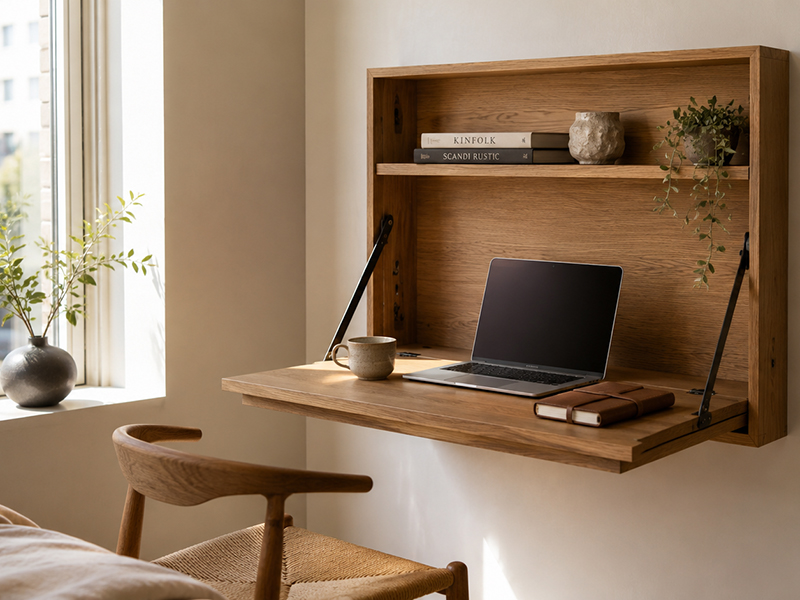
Vertical space activated: the folding desk as architectural detail, not furniture compromise.
1. The 2026 Shift: Why Vertical Space Beats Bulky Traditional Desks
A conventional desk in a 45m² apartment consumes 0.9–1.2m² of floor area permanently — roughly 2–3% of total living space, occupied for 8 hours a day and wasted for the remaining 16. In a room where the sofa, a dining table, a bed and circulation paths already compete for every square metre, a permanent desk is not a workspace. It is an anchor that prevents the room from becoming anything else.
The 2026 Japandi-influenced interior approach treats walls as a third dimension of the floor plan — not as backdrop, but as structure. A wall mounted folding desk mounted at the correct height, finished in warm oak and closed with matte black iron hardware, reads as a cabinet when folded: a deliberate architectural element with clean geometry. It joins modular room dividers and modular coffee table systems as the third leg of the compact apartment’s reconfigurable furniture strategy — each piece earning its footprint across multiple functions and time-of-day modes.
2. The 5-Step How-To Guide
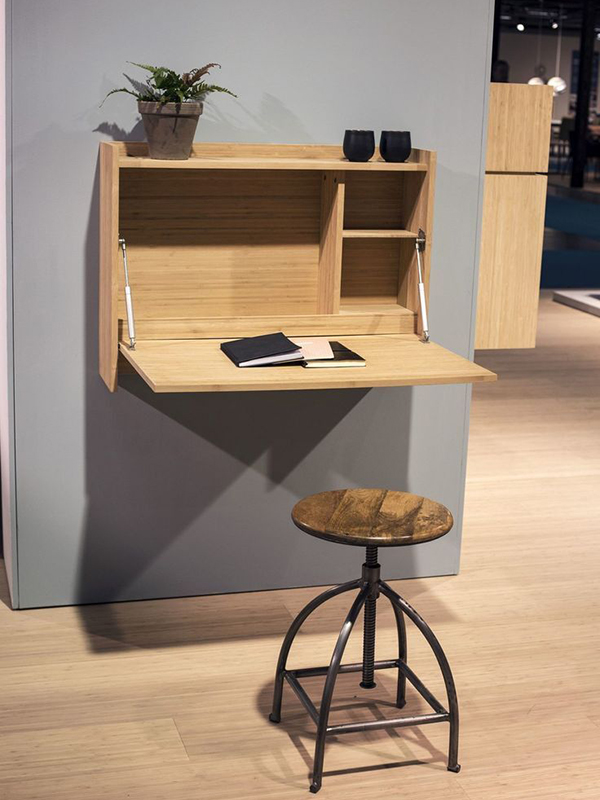
Step 1 — Choose Your Layout Configuration
Not all walls and room geometries suit the same folding desk typology. Match the configuration to the space before selecting hardware or surface finish.
A wall-mounted box cabinet whose front panel folds down on gas-strut hinges to become the desk surface. When closed: a decorative cabinet flush to the wall. Best for living rooms where the desk must be completely invisible at 5 PM. Requires 35–40cm of wall-projection depth when open.
A leaning ladder-frame shelf unit (no wall fixings for the frame) with a dedicated fold-down desk shelf at seated height. Offers integrated open shelving above and below the workspace. Best for renters who need zero wall penetration beyond the two mounting points for the desk hinge itself.
A fold-down surface mounted inside an existing architectural alcove (beside a chimney breast, in a recessed doorway niche, or in a hallway recess). The alcove walls provide natural visual enclosure on three sides, creating a defined workspace zone without any additional room division. The highest-impact configuration for Japandi-aesthetic apartments.
Wall selection rule: always choose a wall parallel to natural light rather than facing it. Working with a window directly ahead produces screen glare; working with light arriving from the left side (for right-handed users) is the ergonomic optimum.
Step 2 — Set Ergonomic Height & Clearances
Ergonomic precision is non-negotiable at compact scale — there is no room to compensate with a footrest or a monitor arm clamped to a wide surface. Get the measurements right on installation day and the workspace functions correctly for every seated hour thereafter.
- Desktop mounting height: 72–75cm from finished floor — the standard ergonomic seated desk height for users of 160–185cm. Adjust ±3cm for height outliers.
- Minimum desk depth (front-to-wall): 55cm for laptop-only use; 65–70cm for external monitor setups.
- Minimum desk width: 80cm for single-monitor; 110–120cm for dual-monitor or document-alongside-screen workflows.
- Chair clearance (desk underside to floor): minimum 65cm vertical clearance for seated knee entry.
- Standing clearance in front of open desk: minimum 80cm from the desk’s front edge to any opposing furniture — enough to pull a chair out fully and stand without obstruction.
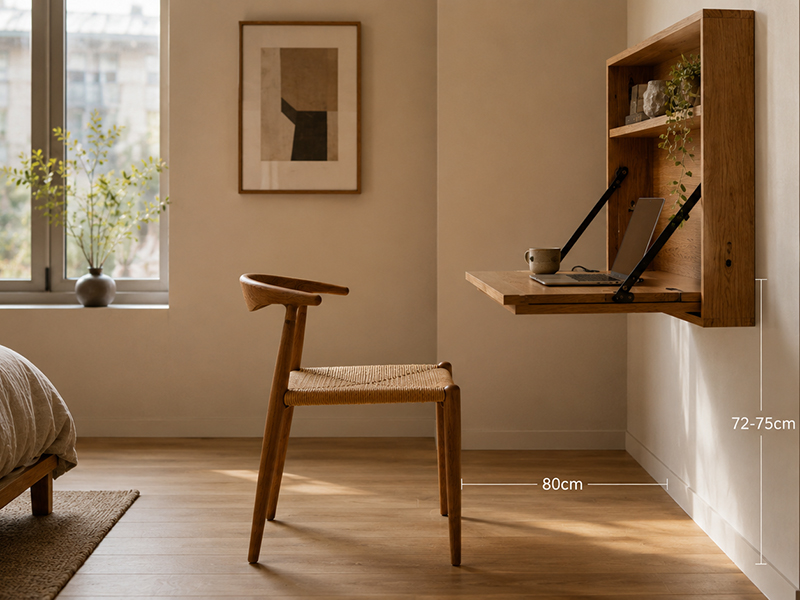
72–75cm mounting height: the measurement that determines every seated hour’s ergonomic quality.
Step 3 — Hardware Selection & Safe Installation
A wall-mounted desk transfers its full dynamic load — desktop weight, equipment, forearm pressure — into the wall substrate at two or four fixing points. Getting the substrate and anchor combination wrong is not an aesthetic failure; it is a structural one.
| Wall Substrate | Anchor Type | Per-Point Load | Notes |
|---|---|---|---|
| Masonry / brick | M8 hex bolt + nylon plug | 80–120kg | Most secure substrate; always drill into brick, not mortar joint |
| Timber stud (plasterboard) | 70mm wood screw into stud | 40–60kg | Locate stud with electronic finder; minimum 2 fixing points per bracket into same stud |
| Drywall only (no stud) | Hollow-wall toggle anchor | 15–25kg | Minimum viable; use only with lightweight desk (<8kg) and no mounted monitor arm |
| Concrete (modern builds) | M8 chemical anchor bolt | 100kg+ | Highest load rating; requires hammer drill and resin injection; most permanent solution |
Gas-strut pistons (the spring-loaded supports that hold the desk surface horizontal when open) should be specified at 1.5× the desktop weight minimum. A 12kg oak desktop needs struts rated at 18kg+ each. Under-specified struts sag over time, causing the desk surface to tilt forward under load — a subtle but progressive ergonomic hazard.
Step 4 — Cable Management & Open Shelf Styling
A wall-mounted desk with exposed cables is a failed workspace. The desk’s vertical surface and the wall section above it become a cable management zone — and with the right approach, that zone becomes a styled element rather than an engineering afterthought.
- Route power vertically: a recessed cable channel (available in warm wood-tone PVC) runs from the desk’s back edge straight down to the skirting — invisible from seated position, accessible from the side.
- One multi-socket bar, hidden: mount a slim 4-socket bar behind the desk back panel or inside the cabinet cavity — a single cable exits to the wall socket. No visible power strip on the desk surface.
- Wireless peripherals only on the desk surface: keyboard, mouse, and trackpad — all wireless. A single USB-C hub handles wired data connections from a position tucked behind the monitor or laptop.
- Shelf styling above the desk: apply the same three-tier formula used for modular open shelving — curated books (warm spine tones), one raw ceramic object, one trailing plant — with one shelf left entirely clear above eye level to preserve visual calm during video calls.
Step 5 — The 5 PM Fold-Away Transition Ritual
The folding desk’s most underrated function is psychological. In a home where work and rest share the same floor plan, the physical act of closing the workspace is a cue the brain learns quickly: this is the end. The ritual takes under three minutes and should be treated as a deliberate, unhurried act rather than a hasty clearance.
- Park the chair: roll or fold the compact chair to its storage position — under the dining table, beside the wardrobe, or folded flat against the wall.
- Clear the surface: laptop into bag or shelf, water glass to the kitchen, notebook to the shelf above. The surface must be clear before folding — nothing stored “underneath for tomorrow”.
- Coil the single cable: one hand unclips the USB-C hub cable from the laptop; the hub stays mounted. One cable, five seconds.
- Lift and close: two hands on the desk surface front edge, lift smoothly — the gas struts take the weight — and press closed until the magnetic catch engages. The wall returns.
- Reset the room: return the smart sofa bed for small apartments cushions to lounge configuration, move the modular coffee table modules back to their cluster position, and light one candle on the shelf above where the desk just was. The workspace is architecturally gone.
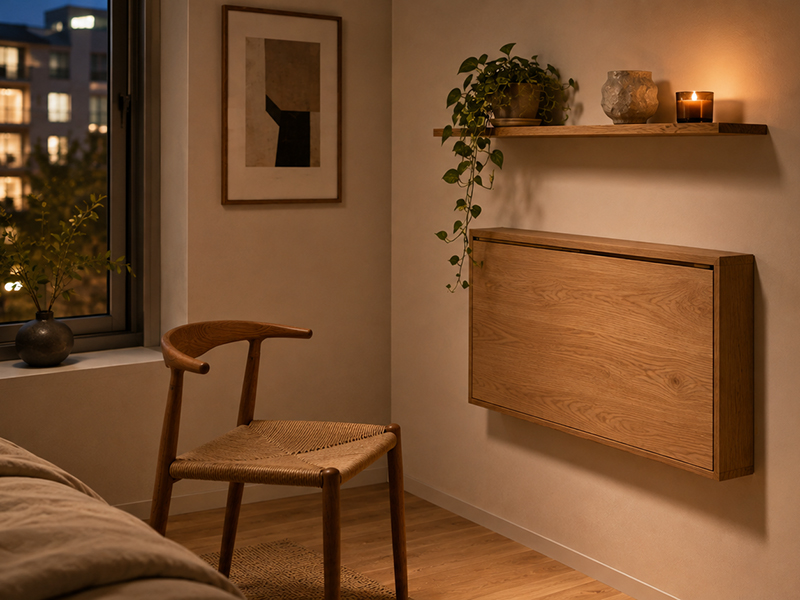
Open shelf above the desk: three objects, one clear shelf, one trailing plant — the post-5PM view.
3. Buyer’s Spec Matrix: Wall Mounted Folding Desk Comparison
Use this matrix to filter products before shortlisting. Any specification marked in red below the threshold should be treated as a disqualifying factor for daily WFH use in a sub-50m² apartment.
| Specification | Minimum Standard | Recommended | Why It Matters |
|---|---|---|---|
| Desktop width | 80cm | 100–120cm | 80cm = laptop + one document; 100cm+ accommodates external monitor alongside laptop |
| Desktop depth (open) | 55cm | 60–70cm | Below 55cm restricts monitor distance below 50cm minimum for eye health |
| Load capacity (static) | 30kg | ≥50kg | Monitor + laptop + accessories + forearm pressure regularly reaches 20–25kg dynamic load |
| Gas-strut rating | 1.5× desktop weight | 2× desktop weight | Under-rated struts sag within 12 months; 2× rating maintains level surface for 5+ years |
| Folded wall projection | ≤20cm | ≤15cm | Beyond 20cm the closed unit reads as furniture rather than wall; breaks the disappear-at-5PM function |
| Surface material | Avoid: thin foil wrap | Solid oak or 18mm MDF + real veneer | Foil-wrapped MDF delaminates at edges within 18 months of daily open-close cycling |
| Edge finish | R ≥ 3mm radius | R ≥ 5mm + solid wood edge banding | Sharp MDF corners chip at wrist-contact height; solid wood edge banding survives daily cycling |
Every wall mounted folding desk requires unobstructed vertical clearance below the mounting bracket as the surface swings down. A desk mounted at 74cm with a 60cm-deep surface needs 74cm of clear wall below the bracket — no skirting radiator, no plug socket within the swing arc. Map this clearance on the wall with masking tape before drilling a single hole.
FAQ — Wall Mounted Folding Desk Questions Answered
Click each question to read the full answer.
📝 Final Thoughts: The Wall Is Your Most Efficient Square Metre
A wall mounted folding desk does not just solve the compact apartment’s workspace problem — it reframes the problem entirely. The question stops being “where do I fit a desk?” and becomes “how do I activate vertical space intelligently?” That shift in thinking is the foundation of every well-resolved sub-50m² interior.
- ✓ Specify load capacity first: 50kg+ static, gas struts at 2× desktop weight.
- ✓ Match substrate to anchor: masonry = M8 bolt; stud = 70mm wood screw; drywall only = lightweight desk exclusively.
- ✓ Map the swing arc before drilling: tape the full open clearance on the wall first.
- ✓ One cable break-point at the hinge: the entire setup disconnects in five seconds.
- ✓ Honour the 5 PM ritual: the fold-away is a psychological boundary, not a furniture task.

• Address: Binh Chuan 44 St, An Phu Ward, Ho Chi Minh City, Vietnam.
• Hotline: +84 979 034 634 / +84 931 155 155
• Email: sales@vietmetalfurniture.com
• Website: sukavinafurniture.com